
How to Set Up Two-Factor Authentication (2FA) on WEEX Exchange

 Prefer us on Google


To boost your account’s security, activating Two-Factor Authentication (2FA) on WEEX is crucial. This extra safeguard ensures only you can access your account, offering added protection for transactions and withdrawals.
Why 2FA Matters on WEEX
2FA provides an additional security layer by requiring a code from your mobile device (via an authenticator app like Google Authenticator or Authy) alongside your password. It blocks unauthorized access, even if someone obtains your password.
Guide to Enabling 2FA on WEEX
Step 1: Sign Into Your WEEX Account
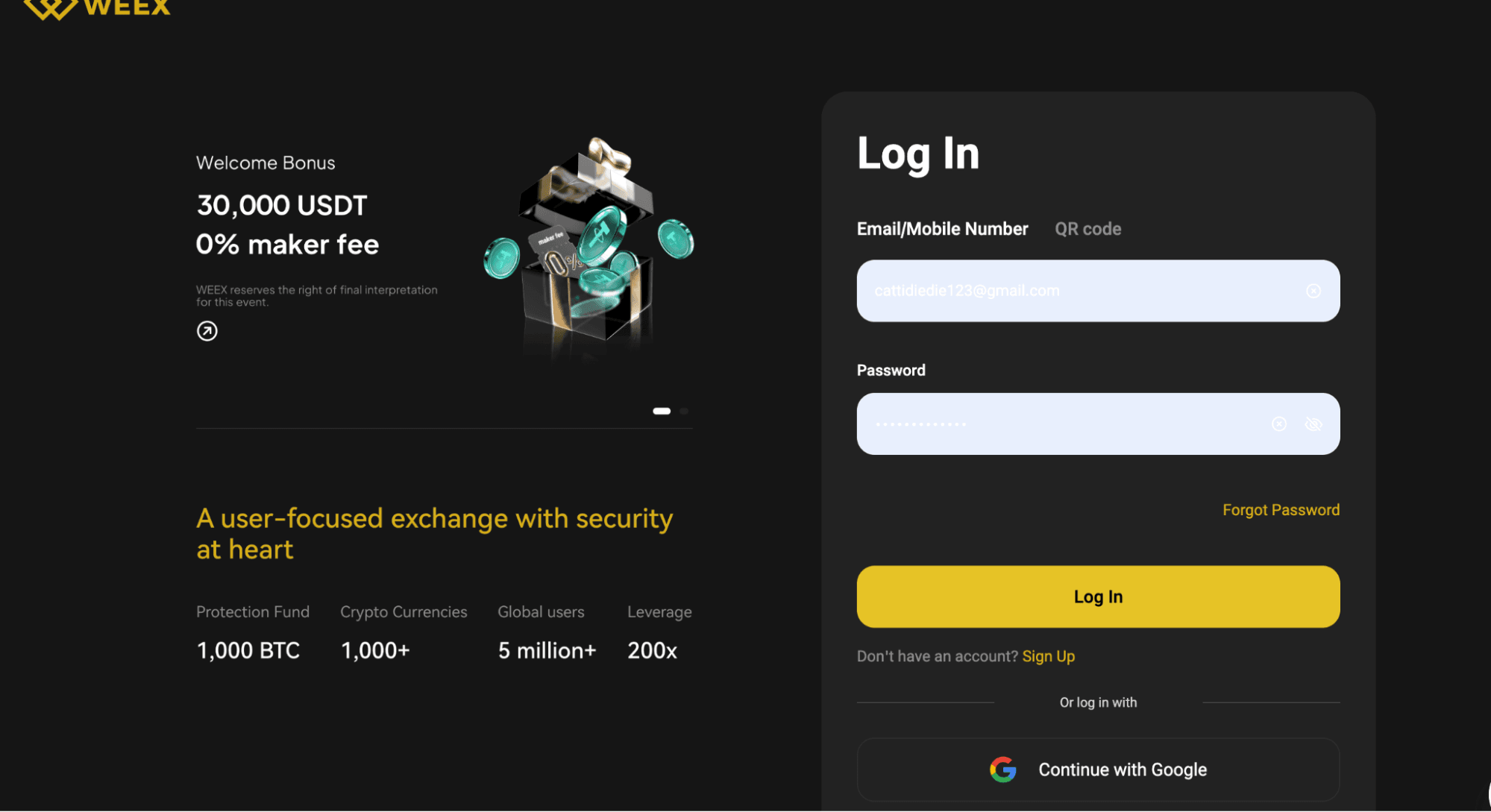
Go to the official WEEX Exchange website and log in with your credentials. Always verify you’re on the legitimate site to avoid phishing risks.
Step 2: Go to Account Settings
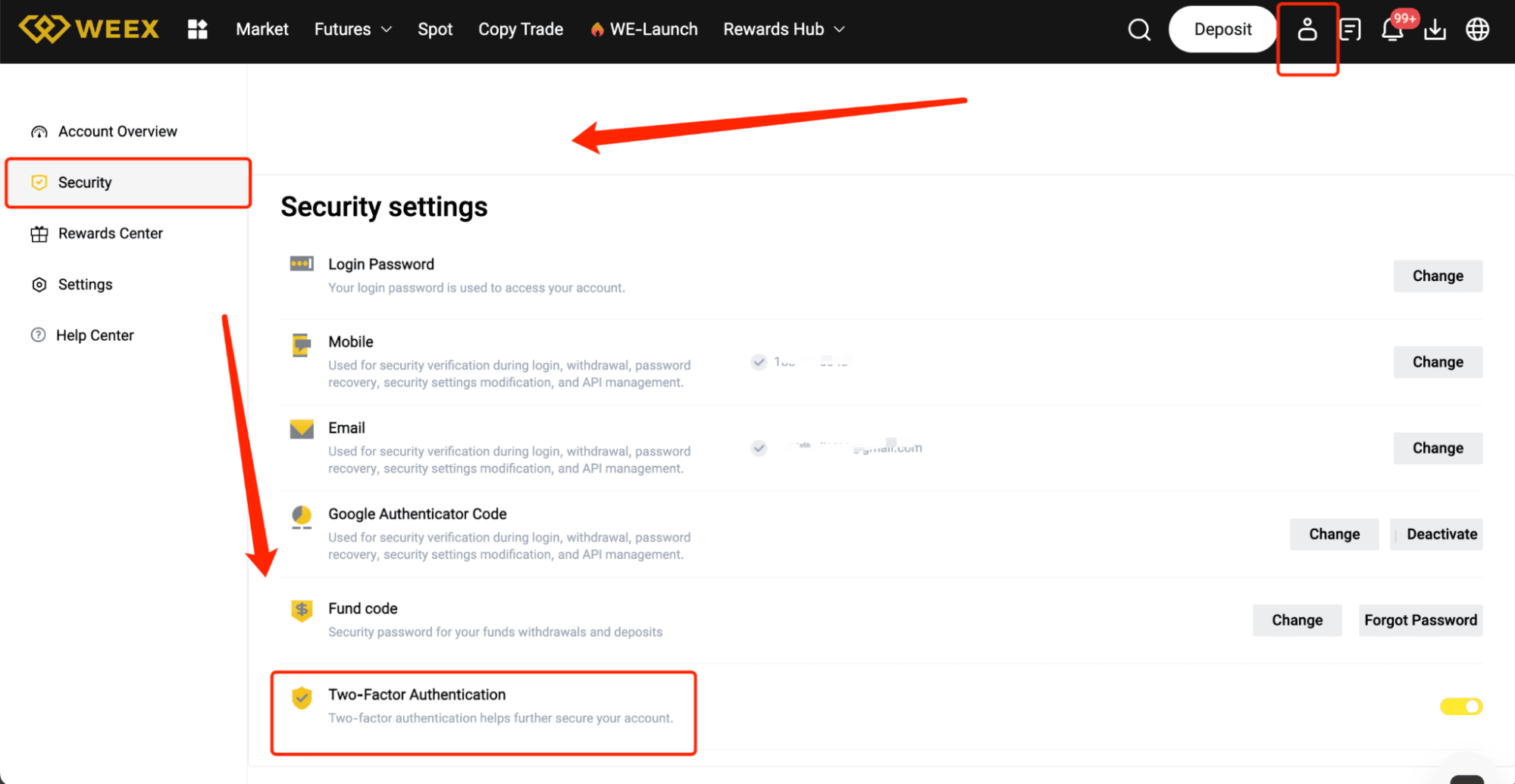
After logging in, click your profile picture or username in the top-right corner to access settings. Choose “Security Settings” or “2FA Settings” from the menu.
Step 3: Select Your 2FA Option
You’ll see various 2FA activation methods. The most popular is using an authenticator app. Select “Enable 2FA via App” (e.g., Google Authenticator or Authy).
Step 4: Scan the QR Code
Open your authenticator app and tap “Add Account” or “Scan QR Code.” Scan the QR code shown on the WEEX website to connect your account to the app.
Step 5: Input the Verification Code
After scanning, your authenticator app will display a 6-digit code. Enter this code on the WEEX website to confirm and finalize the setup.
Step 6: Save Backup Codes
Once 2FA is set up, WEEX will provide backup codes. Write them down and keep them in a safe place, as they allow account access if you lose your authenticator app.
Step 7: Verify and Activate
Review all details, then click “Confirm” or “Activate.” Your 2FA will now be active, enhancing your account’s security.
Tips for a Seamless 2FA Setup
Choose a trusted authenticator app like Google Authenticator or Authy.
Store your backup codes securely in case your device is inaccessible.
Protect your mobile device with a strong PIN or password.
Never share your 2FA codes with anyone—they’re for your safety.
Advantages of 2FA on WEEX
Stronger Security
Safeguard your account from unauthorized access with an extra verification step.
Increased Confidence
Demonstrate your commitment to security, building trust in your account activities.
Protected Trading
With 2FA active, your trades and withdrawals are shielded from unauthorized actions.
Conclusion
Activating 2FA on WEEX is a quick and effective way to secure your account and funds. By following these steps, you’ll add a vital layer of protection to your trading experience. Enable 2FA today for greater peace of mind!
Disclaimer: This content is provided for general branding and informational purposes only and doesn't constitute financial, investment, legal, or tax advice. Any events, rewards, online events, or related information mentioned herein should not be considered a recommendation, solicitation, or invitation to purchase, sell, trade, or otherwise deal in any crypto assets or to use any services. Crypto assets are highly volatile and may result in loss. WEEX services and online events may not be available in all regions and are subject to applicable laws, regulations, and eligibility requirements. You are responsible for ensuring that your use of WEEX services complies with local laws and for carefully assessing the risks before participating in any crypto-related activities.
You may also like

How to Use Grok AI for Crypto Trading: A Practical Guide for 2026
Polymarket vs. Kalshi: Which Prediction Market Platform Survives the Regulatory Crackdown?
How to Read Prediction Market Odds: A Complete Beginner's Guide

What Is Liquidity in Prediction Markets and Why Does It Matter?
How Accurate Are Prediction Markets? What the Research Actually Says
Is Polymarket Legal in the US? What the CFTC Approval Actually Means
Tokenization in Crypto vs Data Security: What Is Tokenization and How Both Protect Your Assets?

Can Crypto Copy Trading Really Make You Money? Is Copy Trading Legit or Scam? Full Guide to WEEX Copy Trading

Play-to-Earn Crypto Games: Complete Guide to P2E Gaming in 2026
How to Buy U.S. Stocks on WEEX: A Complete 2026 Guide to Trading with USDT
What Is TradFi? How Traditional Finance and Crypto Are Converging in 2026
WXT Token Total Supply: How WEEX Token Supply and Burns Work
WXT to USDT: A Beginner's Guide to Converting WEEX Token into USDT

What Is MetaMask? A Complete Guide to the World's Most Popular Web3 Wallet
How to Trade Presidential Election Betting Odds in 2026: The Complete Guide
What Is the US Election Prediction Market? How to Trade on Trump Odds in 2026
Top 4 Altcoins to Buy in July 2026: Top Crypto Picks for Investors
Who Is Jensen Huang? Nvidia CEO's Net Worth, Biography & NVDA Stock Analysis 2026. Is NVDA Stock a Good Buy Right Now?
Prediction Market Regulation: Polymarket, Kalshi and Future Trends
Polymarket vs Kalshi: The Future of Prediction Markets Explained
Polymarket vs Kalshi: The Future of Prediction Markets Explained
Prediction Market Arbitrage Explained: How Traders Find Profits

How Polymarket Market Making Works: Risks and Profit Strategies
What Is a Prediction Market? Complete 2026 Guide to Polymarket, Kalshi & Crypto Betting Platforms
Nvidia vs Microsoft Stock 2026: Which AI Giant Is the Better Buy in July?
MicroStrategy's STRC Unpegged: Buy the Dip or Brace for Impact?
How to Buy Cryptocurrency on WEEX Exchange 2026: Full Guide
Prediction Market Apps 2026: How Prediction Markets Work? Are They Safe and Legal?
Is Polymarket Legal in India in 2026? Key Legal Updates on Prediction Markets
14 Best Prediction Market Apps in 2026: The Ultimate Guide to Crypto-Native and Regulated Platforms
How to Use Grok AI for Crypto Trading: A Practical Guide for 2026
Polymarket vs. Kalshi: Which Prediction Market Platform Survives the Regulatory Crackdown?
How to Read Prediction Market Odds: A Complete Beginner's Guide
What Is Liquidity in Prediction Markets and Why Does It Matter?
How Accurate Are Prediction Markets? What the Research Actually Says
Is Polymarket Legal in the US? What the CFTC Approval Actually Means
Contents
Popular coins
Latest articles



