
How to Open Futures Positions with Spot Assets on WEEX Exchange 2026: Full Guide for Beginners

 Prefer us on Google



You see a futures setup. Your analysis is perfect. But your futures account is dry — and your funds are sitting in spot.
Most traders would stop. Transfer funds manually. Miss the entry.
Not anymore. WEEX now lets you open futures positions directly using spot assets. No manual redemption. No back-and-forth transfers. The system handles it automatically.
If you're into futures trading but hate keeping idle funds in your futures account, this guide is for you.
Let's break down exactly how it works — step by step.
What Is This Feature?
Here's the problem this solves:
You keep most of your funds in spot (to hold). Your futures account has very little. A trading opportunity appears. You need margin — fast.
Normally, you'd:
- Redeem from flexible savings
- Transfer to spot
- Transfer to futures
- Finally open the position
By then, price moved.
With WEEX futures feature:
You select spot as "available" accounts. The system does steps 1-3 automatically. You just place the order.
This is a game changer for active futures trading without keeping large idle balances in your futures account.
Requirements Before Using This Feature
Before you try to open futures positions this way, check these boxes:
- Your spot account or flexible savings account holds available assets (USDT or other supported margin assets)
- On the futures trading page, you manually select those accounts under "Available"
- You are not in multi-asset margin mode (not supported yet)
- You are placing a standard order — not a planned order or trailing stop (those aren't supported yet)
Simple enough. Now let's walk through the actual steps.
Step-by-Step: How to Enable Spot Assets for Futures Trading
Step 1: Go to WEEX Futures Trading Page
Go to WEEX official website and log into your WEEX account. Navigate to the Futures trading interface.
Step 2: Find Funds Section
Look at the order placement area. You'll see a button . This controls which accounts can be used for margin.
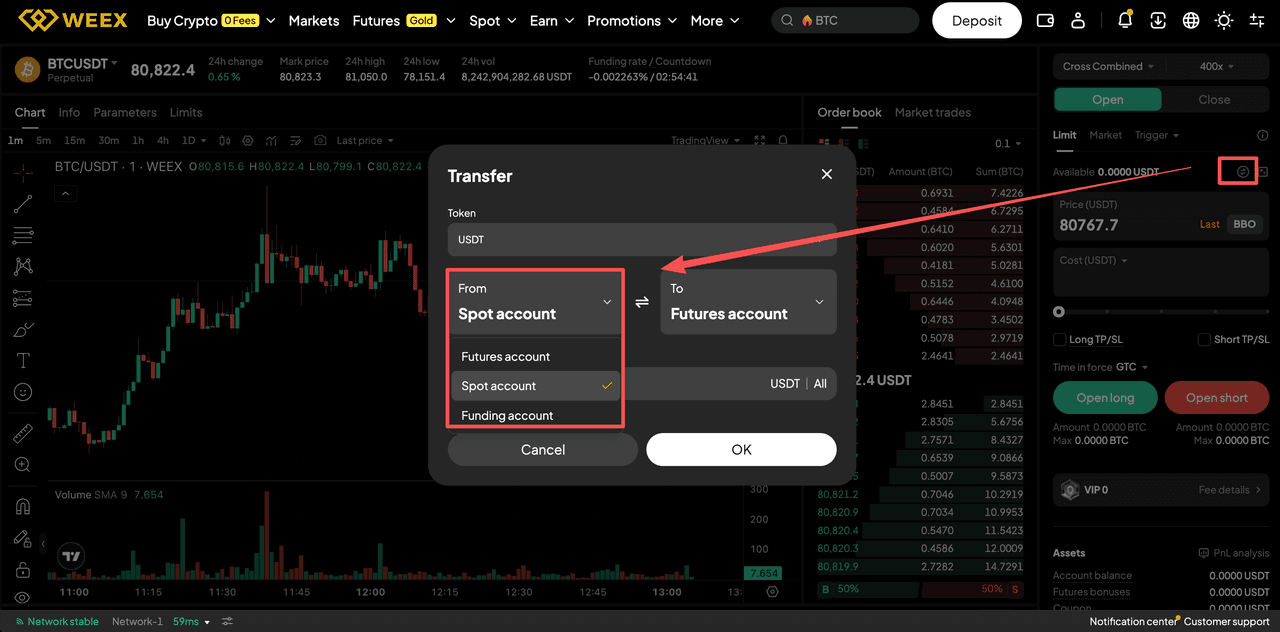
Step 3: Select Accounts You Want to Use
Click Available. You'll see options:
- Futures account (selected by default)
- Spot account
Select one or both of the additional accounts. Your choice.
Step 4: Place Your Futures Order
Enter price and quantity as usual. Submit the order.
What happens next:
If futures balance is enough → system uses futures only.
If futures balance is insufficient → system automatically redeems from flexible savings and/or transfers from spot to cover the gap.
Position opens. You did nothing extra.
Important Notes
Before using this for futures trading on WEEX, understand these limitations:
- Redemption and transfer still take a few seconds. Network conditions apply.
- Can still fail – If flexible savings redemption fails (limits, system issues), your order fails.
- No auto re-staking – Redeemed assets don't go back to flexible savings automatically.
- Liquidation won't touch spot – If you get liquidated, your spot and flexible savings assets are safe. Only futures account is affected.
- Not supported in multi-asset margin mode – Switch modes if you want this feature.
Who Is This Feature For?
This feature makes sense for three types of traders:
- Yield seekers – You keep funds in flexible savings earning interest but still want to trade futures instantly.
- Active futures traders – You hate holding large idle balances in futures account. Pull only when needed.
- Isolated position swing traders – You need to add margin quickly without manual redemption steps.
If you're a passive long-term holder who never trades futures? Ignore this. If you trade actively? Learn it.
Conclusion
Open futures positions on WEEX without manual fund shuffling? Yes. And it works.
The feature is simple: select spot as available accounts. The system does the rest when your futures balance falls short.
It's not for everyone. Multi-asset margin mode and advanced order types aren't supported yet. But for standard futures trading, it saves time and reduces friction.
If you're tired of missing entries because your funds are stuck in savings or spot — enable this today. Test with a small position first. Then scale.
Ready to trade? WEEX offers zero fees, instant execution, and the security you need. Sign up on WEEX Now and Start Trading!
FAQ
What does it mean to open futures positions using spot assets?
It means if your futures account balance is insufficient, WEEX automatically transfers the needed amount from your spot account to cover margin. No manual transfer required.
Does WEEX charge extra fees for using spot or flexible savings as margin?
No. You only pay standard futures trading fees. No extra fee for auto-redemption or auto-transfer.
If I get liquidated, will WEEX take my spot or flexible savings assets?
No. Liquidation only affects your futures account balance. Spot and flexible savings assets are never touched.
Latest Updates on WEEX
If you want to buy WXT now, you can sign up for a WEEX account.
Welcome Bonus from WEEX — Claim Up to 30,000 USDT! Join Now!
Disclaimer: This content is provided for general branding and informational purposes only and doesn't constitute financial, investment, legal, or tax advice. Any events, rewards, online events, or related information mentioned herein should not be considered a recommendation, solicitation, or invitation to purchase, sell, trade, or otherwise deal in any crypto assets or to use any services. Crypto assets are highly volatile and may result in loss. WEEX services and online events may not be available in all regions and are subject to applicable laws, regulations, and eligibility requirements. You are responsible for ensuring that your use of WEEX services complies with local laws and for carefully assessing the risks before participating in any crypto-related activities.
You may also like

How to Use Grok AI for Crypto Trading: A Practical Guide for 2026
Polymarket vs. Kalshi: Which Prediction Market Platform Survives the Regulatory Crackdown?

How to Read Prediction Market Odds: A Complete Beginner's Guide

What Is Liquidity in Prediction Markets and Why Does It Matter?
How Accurate Are Prediction Markets? What the Research Actually Says
Is Polymarket Legal in the US? What the CFTC Approval Actually Means

Tokenization in Crypto vs Data Security: What Is Tokenization and How Both Protect Your Assets?

Can Crypto Copy Trading Really Make You Money? Is Copy Trading Legit or Scam? Full Guide to WEEX Copy Trading

Play-to-Earn Crypto Games: Complete Guide to P2E Gaming in 2026

How to Buy U.S. Stocks on WEEX: A Complete 2026 Guide to Trading with USDT

What Is TradFi? How Traditional Finance and Crypto Are Converging in 2026

WXT Token Total Supply: How WEEX Token Supply and Burns Work
WXT to USDT: A Beginner's Guide to Converting WEEX Token into USDT

What Is MetaMask? A Complete Guide to the World's Most Popular Web3 Wallet
How to Trade Presidential Election Betting Odds in 2026: The Complete Guide
What Is the US Election Prediction Market? How to Trade on Trump Odds in 2026
Top 4 Altcoins to Buy in July 2026: Top Crypto Picks for Investors
Who Is Jensen Huang? Nvidia CEO's Net Worth, Biography & NVDA Stock Analysis 2026. Is NVDA Stock a Good Buy Right Now?
Prediction Market Regulation: Polymarket, Kalshi and Future Trends
Polymarket vs Kalshi: The Future of Prediction Markets Explained
Polymarket vs Kalshi: The Future of Prediction Markets Explained

Prediction Market Arbitrage Explained: How Traders Find Profits

How Polymarket Market Making Works: Risks and Profit Strategies
What Is a Prediction Market? Complete 2026 Guide to Polymarket, Kalshi & Crypto Betting Platforms
Nvidia vs Microsoft Stock 2026: Which AI Giant Is the Better Buy in July?
MicroStrategy's STRC Unpegged: Buy the Dip or Brace for Impact?
How to Buy Cryptocurrency on WEEX Exchange 2026: Full Guide
Prediction Market Apps 2026: How Prediction Markets Work? Are They Safe and Legal?
Is Polymarket Legal in India in 2026? Key Legal Updates on Prediction Markets
14 Best Prediction Market Apps in 2026: The Ultimate Guide to Crypto-Native and Regulated Platforms
How to Use Grok AI for Crypto Trading: A Practical Guide for 2026
Polymarket vs. Kalshi: Which Prediction Market Platform Survives the Regulatory Crackdown?
How to Read Prediction Market Odds: A Complete Beginner's Guide
What Is Liquidity in Prediction Markets and Why Does It Matter?
How Accurate Are Prediction Markets? What the Research Actually Says
Is Polymarket Legal in the US? What the CFTC Approval Actually Means
Contents
Popular coins
Latest articles